
What this tool helps you investigate
Use the CFTC positioning workspace to inspect reported weekly positions for supported global futures markets. The tool shows managed money for commodities and leveraged funds for financial futures, alongside other reportables.
A report date records when the positions were observed; publication happens later. This is weekly positioning context rather than a live order-flow feed. The screenshot is a historical interface example; the current workspace moves these controls into the side panel.
Read the workspace
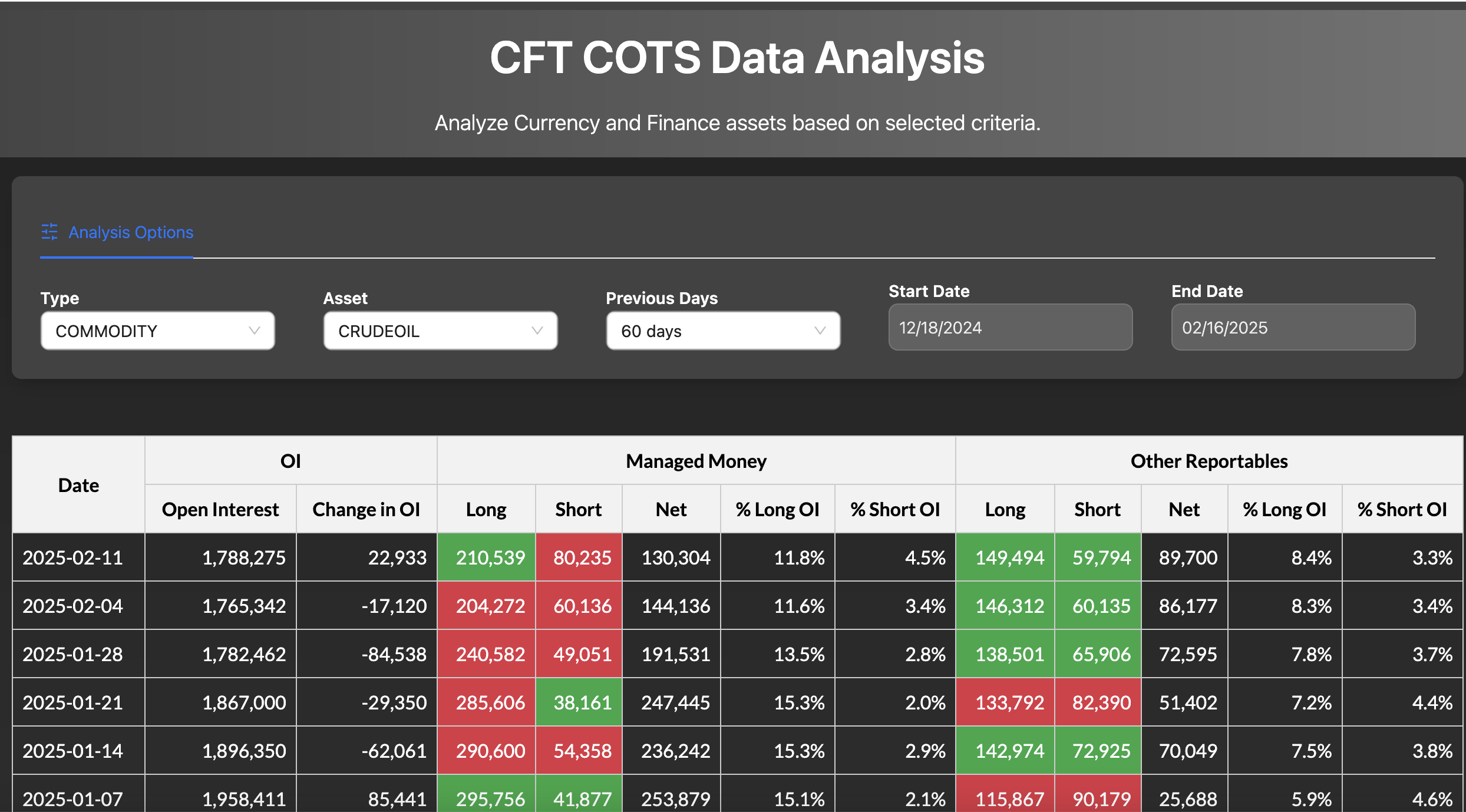
- Report family. The historical interface calls this Type; the current control is Report family.
- Contract market. Select the market within its report family before comparing participants.
- Report window. The selected dates limit the report observations; they are not intraday sampling dates.
- Longs, shorts and net. Net is long contracts minus short contracts. A lower net can coexist with added longs if shorts increase faster.
How to use CFTC COT positioning
- Choose the report family: commodities or financial futures.
- Select the market or contract and the lookback or custom date range.
- Read long, short and net positions for the same participant group.
- Compare weekly changes with total OI and the matching price history.
Understand the measurements
| Measurement | How to read it |
|---|---|
| Net positions | Long contracts minus short contracts for the named group. |
| Open interest | Outstanding contracts in the report scope. |
| % long or short OI | The group position relative to reported OI; not a market-direction probability. |
| Report date | Observation date, distinct from publication date. |
A worked example
If managed money holds 210,000 longs and 80,000 shorts, net positioning is +130,000 contracts. If the prior net was +144,000, the group remains net long but its net length fell by 14,000. Added longs and even larger added shorts can produce that change.
This example explains the calculation or reading process. It is not a current market observation or a trade recommendation.
Checks before drawing a conclusion
- Match report family, market and participant group when comparing weeks.
- Other reportables are a specific category, not every participant outside managed money.
- Weekly reports are delayed observations and category aggregates can mix hedging and speculative positions.
Report methodology
The CFTC COT report methodology explains the report families, participant classifications, observation dates and publication timing.