
The two weighting formulas
| Measure | Put side divided by call side | Meaning |
|---|---|---|
| Premium WPCR | Σ(put volume × put LTP) ÷ Σ(call volume × call LTP) | A snapshot premium-weighted trading-activity proxy |
| Delta-OI WPCR | Σ(put OI × |put delta|) ÷ Σ(call OI × |call delta|) | Outstanding OI weighted by modeled directional sensitivity |
| Standard volume PCR | Σ(put volume) ÷ Σ(call volume) | The raw contract-volume comparison |
These are not distance-from-spot or expiry weights. Absolute delta keeps put and call magnitudes comparable without dividing by a negative put delta. For one instrument and expiry, the common lot multiplier cancels from each ratio.
Volume multiplied by the latest premium is a proxy: it is not the sum of the actual prices paid for every earlier trade, and it does not measure net invested capital or identify buyers.
Screenshot: compare the weighted series
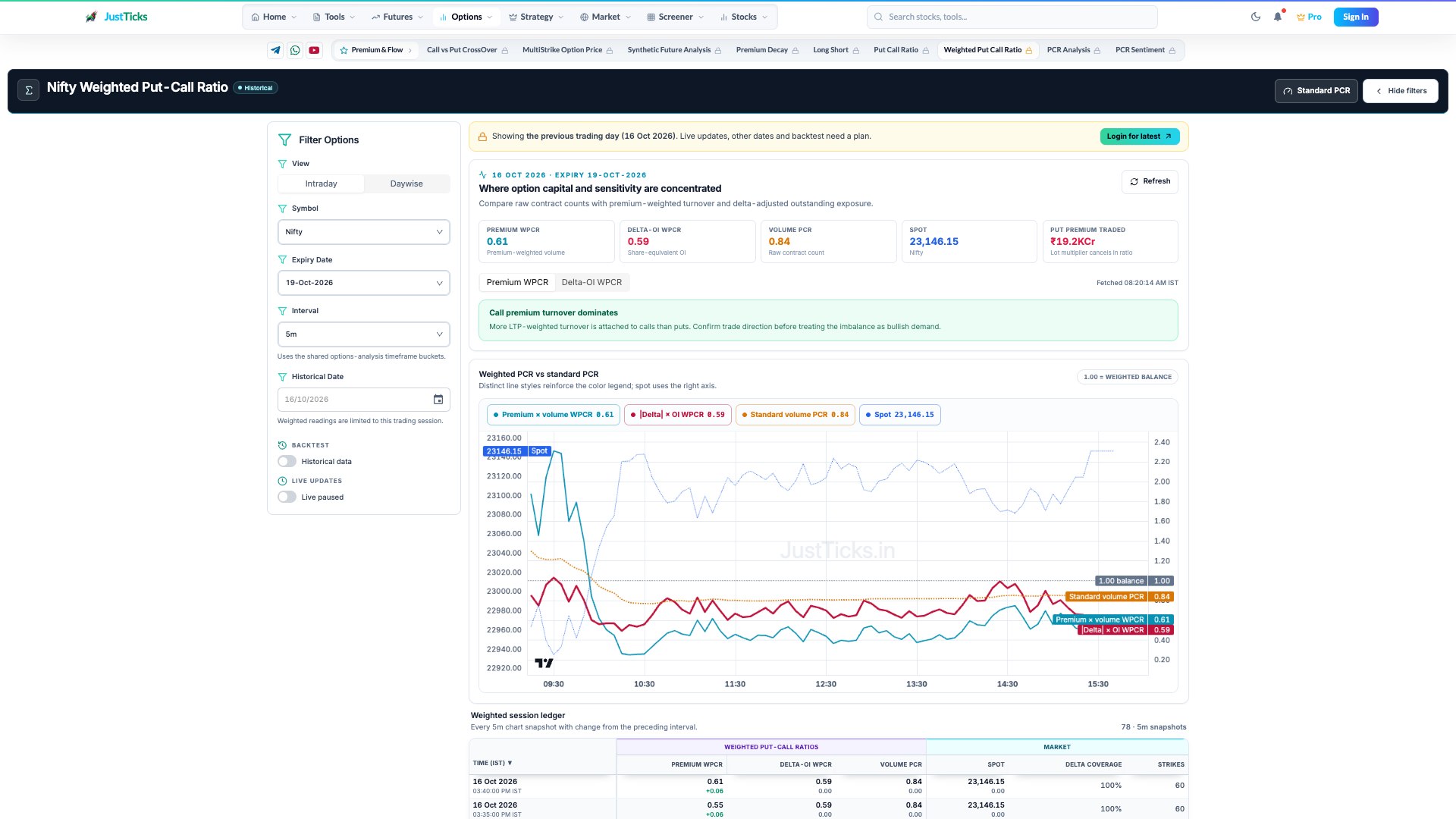
- View and scope. Intraday and daywise views summarize different windows. Hold the symbol and expiry fixed.
- Premium versus delta weighting. Premium WPCR weights traded volume by LTP; Delta-OI WPCR weights open interest by absolute delta.
- Standard comparison. The standard volume PCR is a raw contract-count ratio and can disagree with either weighted measure.
- Weighted ledger. Inspect timestamps, delta coverage and included strikes rather than relying on the final value alone.
Use the weighted PCR tool
- Choose instrument, expiry, date and timeframe in the filters. Keep the same scope when opening standard PCR.
- Read Premium WPCR, Delta-OI WPCR and Volume PCR separately in the summary.
- Use the series controls to isolate the weighted measure you want, leaving the standard-volume reference visible.
- Compare matched timestamps in the ledger and check Delta Coverage. Missing eligible deltas make the delta-weighted result a partial view.
- Open the option chain to check whether a difference is spread across strikes or concentrated in a few contracts.
Worked example: weighting can reverse the comparison
In an illustrative snapshot, put volume is 200 contracts at LTP 20 and call volume is 100 contracts at LTP 100. Standard volume PCR is 2.00, while premium WPCR is (200 × 20) ÷ (100 × 100) = 0.40. More put contracts traded, but the premium-weighted activity is larger on calls.
Neither result proves whether the contracts were bought, written or part of spreads. The ratio change is a consequence of the weighting, not an independent price forecast.
When weighted comparisons mislead
LTPs can be stale. Changes in IV and moneyness alter premiums and deltas even without a change in contract counts. Excluded or invalid deltas affect coverage, and small denominators can make ratios unstable. Compare matching expiries and use the standard PCR as context.